CCNA1 ITN Module 9 - Address Resolution

Date Subject Lesson Plan
12/16/25 CCNA1

Students earning in top 2 spots in any of their regional contests earn 25 extra credit points and go to state overnight competition in Columbus in March.

Students earning in top 5 spots at state competition earn 100 extra credit points and get to attend National competition for 5 days in Orlando, FL in May.

Start Module 9 - Address Resolution

Link: Module 9 Reading Organizer

Read: 9.0.1 Why should I take this module?

Read: 9.0.2 What will I learn to do in this module?

Start Module 9, Section 1 - MAC and IP

Read: 9.1.1 Destination on Same Network

Read: 9.1.2 Destination on Remote Network

PT: 9.1.3 Identify MAC and IP Addresses (30 minutes)

Activity: 9.1.4 Check Your Understanding - MAC and IP

Start Module 9, Section 2 - ARP

Read: 9.2.1 ARP Overview

Reference Video: Keith Barker: How Address Resolution Protocol (ARP) Works (5:28)

Read: 9.2.2 ARP Functions

Demonstration Video: 9.2.3 ARP Request (2:53)

Demonstration Video: 9.2.4 ARP Operation - ARP Reply (1:45)

Demonstration Video: 9.2.5 ARP Role in Remote Communications (3:01)

Read: 9.2.6 Removing Entries from an ARP Table

Read: 9.2.7 ARP Tables on Networking Devices

Read: 9.2.8 ARP Issues - ARP Broadcasts and ARP Spoofing

PT: 9.2.9 Examine the ARP Table (30 minutes)

Activity: 9.2.10 Check Your Understanding - ARP

Assignment: Module 9 Reading Organizer Questions 1-37

  A+

None today

12/17/25 CCNA1

Video: Internet Protocol - IPv4 vs IPv6 as Fast As Possible (6:11)

Start Module 9, Section 3 - IPv6 Neighbor Discovery
Video: Wendell Odom: IPv6 Neighbor Discovery (15:54)

Demonstration Video: 9.3.1 IPv6 Neighbor Discovery (6:06)

Read: 9.3.2 IPv6 Neighbor Discovery Messages

Read: 9.3.3 IPv6 Neighbor Discovery - Address Resolution
Video: Rick Graziani: IPv6 Fundamentals: ICMPv6 Neighbor Discovery (4:58)

PT: 9.3.4 IPv6 Neighbor Discovery (45 min)

Activity: 9.3.5 Check Your Understanding - Neighbor Discovery

Start Module 9, Section 4 - Module Practice and Quiz

Read: 9.4.1 What did I learn in this module?

Read: 9.4.2 Module Quiz - Address Resolution

Assignment: Module 9 Reading Organizer questions 38-53 (end)

Assignment: Study for Module 9 Test tomorrow

  A+

Activity: 5.2.5.14 Check Your Understanding - Network Services

Video Explanation: 5.3.1.1 Basic Network Devices

Read: 5.3.1.2 Network Interface Card (NIC)
Video: How NIC works (1:29)

Read: 5.3.1.3 Repeaters, Bridges, and Hubs
Video:Professor Messer: Network Devices (17:29)

12/18/25 CCNA1

Review: Module 9

Review Video: Jason Johnson: Module 9 (6:59)

Test: Module 9

  A+

Read: 5.3.1.4 Switches
Video: Different types of Network Switches (4:45)

Read: 5.3.1.5 Wireless Access Points
Video: The Three Flavors of Wireless Access Points (7:07)

Read: 5.3.1.6 Routers
Video: Understanding Routing! (6:58)

Activity: 5.3.1.7 Check Your Understanding - Basic Network Devices

Video Explanation: 5.3.2.1 Security Devices (2:29)
Read: 5.3.2.2 Firewalls
Video: Techquickie: Firewalls as Fast As Possible (4:41)

Read: 5.3.2.3 IDS and IPS
Video: Keith Barker: IDS vs. IPS (6:56)

Read: 5.3.2.4 UTMs
Video: Professor Messer: Web Security Gateways and UTMs (2:33)

Read: 5.3.2.5 Endpoint Management Server
Video: Professor Messer: Endpoint Protection (9:48)

Read: 5.3.2.6 Spam Management

Activity: 5.3.2.7 Check Your Understanding - Security Devices

Read: 5.3.3.1 Legacy and Embedded Systems

Read: 5.3.3.2 Patch Panel
Video: How to Punch Down a Network Ethernet Patch Panel (7:20)
Video: How To Punch Down Cat5/E/Cat6 Keystone Jack (5:47)

Read: 5.3.3.3 Power over Ethernet and Ethernet over Power

Read: 5.3.3.4 Cloud-based Network Controller

Activity: 5.3.3.5 Check Your Understanding - Other Network Devices


12/19/25 CCNA1

Finish any labs that need completed.

  A+

Video Demonstration: 5.4.2.8 Build and Test a Network Cable (6:54)

Video: How to Wire Up Ethernet Plugs the EASY WAY (6:17)
Lab 5.4.2.8: Build and Test a Network Cable using pass-thru RJ-45 connectors.

Video Demonstration: 5.4.2.7 Build and Test a Network Cable (6:54)

Lab: 5.4.2.8 Build and Test a Network Cable - Pass through
Video: How To Make RJ45 Network Patch Cables - Cat 5E and Cat 6 (12:08)

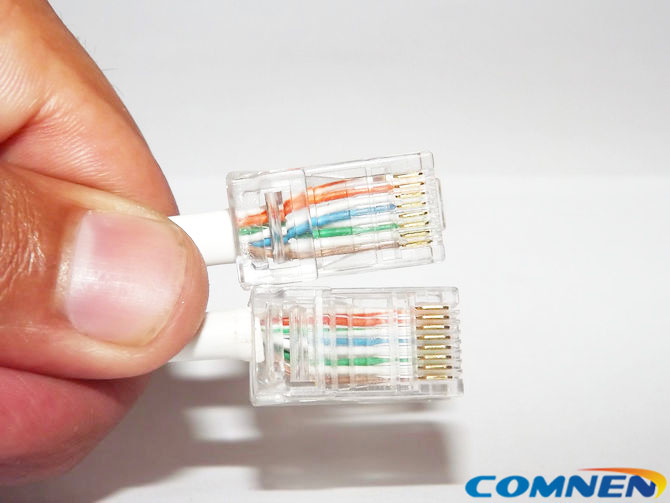
Link: Picture of unsatisfactory crimps

The 3 biggest issues with RJ-45 Termination:

  • Wire jacket not pinched by plastic rib
  • Wires in wrong order
  • Wires not pushed far enough into connector before crimping

I'll need to see your completed lab packet, completed cable, and view the cable test when we return from break.

A+ Mid-term exams coming up!

Study items such as:

Parts of a computer & I/O panel ports and sockets
Units of measure (RAM, storage, etc.)
Basic PC commands
Basic networking
Binary math
Basic protocols
RAID
Basic hot keyes
Basic security
CPU socket types
Network topology types

  BPA Prep BPA Teams/Individual contest prep- on your own